DevOps Lifecycle, Principles & Roles Explained for Beginners (2026)
Learn the 8 stages of the DevOps lifecycle, 4 core DevOps principles, DevOps engineer roles and responsibilities, Agile vs DevOps differences, and Infrastructure as Code — explained simply for beginners.
DevOps Lifecycle, Principles & Roles Explained for Beginners (2026)
Why Does DevOps Even Exist?
Before DevOps became a thing, software teams had a serious problem.
Developers would spend weeks or months building a feature, then hand it over to the operations team to deploy. The operations team, who had no involvement in building it, would then struggle to get it running on production servers. Deployments would fail. Bugs would appear that never showed up in development. Fingers would get pointed. Time would get wasted.
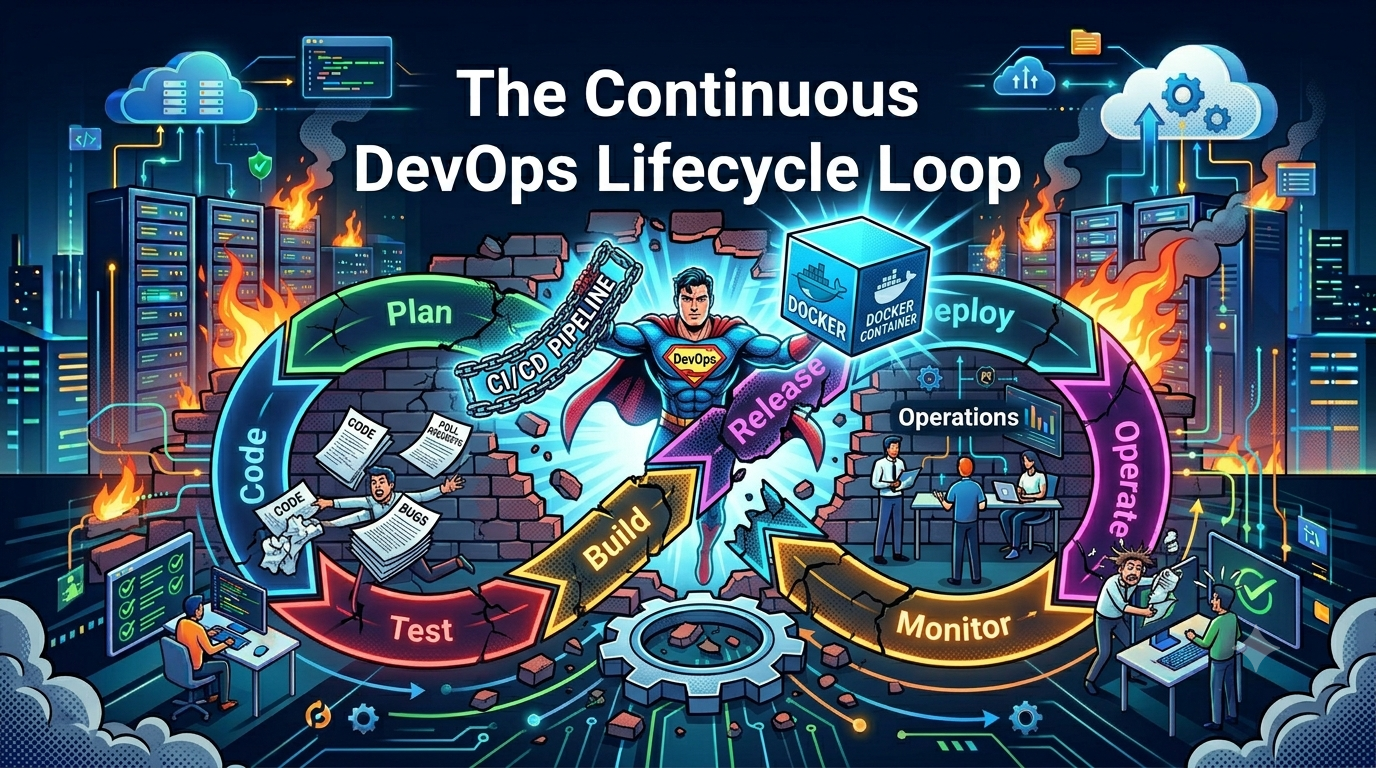
This back-and-forth created what is commonly called a "wall of confusion" — developers throwing code over the wall and operations trying to catch it without breaking anything.
DevOps was built to tear down that wall. Instead of two separate teams working in isolation, DevOps brings everyone into a shared, continuous process where code moves from idea to production smoothly, quickly, and reliably.
The DevOps Lifecycle — 8 Stages Explained
The DevOps lifecycle is a continuous loop of 8 stages. It is often represented as an infinity symbol because the process never truly ends — once software is deployed, it is monitored, improved, and the cycle starts again.
Here are all 8 stages:
| No. | Stage | What Happens Here |
|---|---|---|
| 1 | Plan | Teams define what needs to be built — features, fixes, improvements |
| 2 | Code | Developers write the actual code based on the plan |
| 3 | Build | The code is compiled and converted into a runnable application |
| 4 | Test | Automated tests check the code for bugs and errors |
| 5 | Release | The tested code is prepared and approved for deployment |
| 6 | Deploy | The application is pushed to production servers |
| 7 | Operate | The live application is managed and maintained |
| 8 | Monitor | System performance, errors, and user behaviour are tracked continuously |
The key word here is continuous. Unlike traditional development where these stages happened in long, separate phases, DevOps runs them in short, fast cycles — sometimes multiple times a day.
Breaking Down Each Stage
1. Plan
Every cycle starts with planning. Teams decide what to build next — a new feature, a bug fix, a performance improvement. Tools like Jira, Trello, and Azure Boards are commonly used here to track work and manage priorities.
2. Code
Developers write the code. They work in small, focused branches and push changes frequently rather than building everything in one go. Git is the standard version control tool used at this stage.
3. Build
Once the code is written, it needs to be compiled or packaged into something that can actually run. Build tools like Maven, Gradle, and npm handle this. If the build fails, the team knows immediately and fixes it before moving forward.
4. Test
Automated tests run against every build to catch bugs early. This includes unit tests, integration tests, and security scans. The goal is to find problems here — not in production.
5. Release
The tested, approved build is prepared for deployment. This stage involves version tagging, release notes, and final approvals. In mature DevOps teams, this step is largely automated.
6. Deploy
The application goes live. Modern deployment pipelines push code to production automatically using tools like Jenkins, GitLab CI, and GitHub Actions. Deployment strategies like Blue-Green and Canary deployments ensure that releases happen with zero downtime.
7. Operate
The live application needs to be kept running. This involves managing servers, scaling resources up or down based on demand, and handling any infrastructure issues that come up.
8. Monitor
Once the application is live, monitoring tools track everything — server performance, error rates, response times, and user behaviour. Tools like Prometheus and Grafana are used here. If something goes wrong, alerts fire and the team responds. The insights gathered here feed back into the next planning cycle.
The 4 Core DevOps Principles
DevOps is not just a set of tools — it is built on 4 fundamental principles that shape how teams work.
1. Collaboration
Development and operations teams work together from day one rather than handing off work at the end. Everyone shares responsibility for the final product — both for building it and for keeping it running.
2. Automation
Anything that can be automated, should be automated. Building, testing, deploying, monitoring — automating these steps removes human error, speeds up delivery, and frees engineers to focus on higher-value work.
3. Continuous Improvement
DevOps teams are never "done." They constantly look for ways to improve — faster build times, fewer production incidents, better monitoring, smoother deployments. Every cycle is an opportunity to get better.
4. Monitoring and Feedback
You cannot improve what you cannot measure. Continuous monitoring of live systems provides real data about what is working and what is not. This feedback loop drives every future decision — from infrastructure changes to new feature priorities.
What Does a DevOps Engineer Actually Do?
A DevOps engineer sits at the intersection of development, operations, and automation. Here is what a typical DevOps engineer works on day to day:
- CI/CD pipelines — building and maintaining the automated pipelines that take code from a developer's commit to a live production deployment
- Infrastructure management — provisioning and managing servers, databases, and networking — increasingly done through code rather than manual configuration
- Containerization — packaging applications into Docker containers so they run consistently across all environments
- Monitoring and alerting — setting up dashboards and alert systems so the team always knows the health of the application
- Security integration — embedding security checks into the pipeline so vulnerabilities are caught early
- Incident response — when production systems break, the DevOps engineer is often the first to investigate and restore service
A DevOps engineer is not purely a developer and not purely a sysadmin. They need to understand both worlds — and the tools that connect them.
Agile vs DevOps — What Is the Difference?
Agile and DevOps are often mentioned together, which causes confusion. They are related but they are not the same thing.
| Point | Agile | DevOps |
|---|---|---|
| Focus | How software is planned and developed | How software is delivered and operated |
| Scope | Development team | Development + Operations together |
| Goal | Deliver working software in short sprints | Deliver software continuously and reliably |
| Feedback | From stakeholders and product owners | From live production systems and monitoring |
| Tools | Jira, Scrum boards, sprint planning | Jenkins, Docker, Kubernetes, Prometheus |
The simple way to think about it:
Agile answers the question — how do we build the right software?
DevOps answers the question — how do we get that software to users as fast and reliably as possible?
In most modern teams, Agile and DevOps work together. Teams plan and build in Agile sprints, and DevOps practices ensure that what gets built is automatically tested, deployed, and monitored.
Infrastructure as Code (IaC) — Managing Servers Like Software
Traditionally, setting up a server meant logging in manually, installing software, configuring settings, and hoping you remembered every step correctly. If you needed to set up ten servers, you did it ten times — and inconsistencies were almost guaranteed.
Infrastructure as Code (IaC) changes this completely. Instead of manual setup, you write code that describes exactly what your infrastructure should look like — which servers to create, what software to install, how they should be configured. That code can then be version controlled, reviewed, and executed automatically.
The benefits are significant:
- Consistency — every environment (development, testing, production) is set up exactly the same way
- Speed — spinning up a new server takes minutes instead of hours
- Reliability — human error in manual setup is eliminated
- Version control — infrastructure changes are tracked just like code changes
The two most widely used IaC tools are Terraform (for provisioning cloud infrastructure) and Ansible (for configuring software on servers). Both will be covered in detail later in this series.
Interview Q&A
Q1. What is the DevOps lifecycle?
The DevOps lifecycle is a continuous 8-stage process: Plan, Code, Build, Test, Release, Deploy, Operate, and Monitor. It is represented as an infinite loop because the cycle never ends — once software is deployed and monitored, the insights gathered feed directly back into the next planning stage. The key characteristic of the DevOps lifecycle is that these stages run continuously and in short cycles rather than as long, separate phases.
Q2. What are the core principles of DevOps?
DevOps is built on 4 core principles. Collaboration brings development and operations teams together to share responsibility for the product. Automation removes manual steps from building, testing, and deploying software. Continuous Improvement means teams constantly look for ways to work faster and more reliably. Monitoring and Feedback ensures that real data from live systems drives every future decision.
Q3. What is the difference between Agile and DevOps?
Agile is a methodology for how software is planned and developed — typically in short sprints with regular feedback from stakeholders. DevOps is a set of practices for how software is delivered, deployed, and operated continuously. Agile focuses on the development team; DevOps bridges development and operations. In modern teams, Agile and DevOps complement each other — teams build in Agile sprints and use DevOps practices to deploy and monitor what they build.
Q4. What does a DevOps engineer do?
A DevOps engineer builds and maintains CI/CD pipelines, manages cloud infrastructure, containerizes applications using Docker, sets up monitoring and alerting systems, integrates security into the development pipeline, and responds to production incidents. They sit at the intersection of development and operations — understanding both the software being built and the infrastructure it runs on.
Q5. What is Infrastructure as Code?
Infrastructure as Code (IaC) is the practice of managing and provisioning servers, networks, and other infrastructure through code rather than manual processes. Tools like Terraform and Ansible allow engineers to define their entire infrastructure in configuration files that can be version controlled, reviewed, and executed automatically. This ensures consistency across environments, eliminates human error, and makes infrastructure changes as trackable as software changes.
Q6. Why is monitoring important in DevOps?
Monitoring is the feedback mechanism that makes continuous improvement possible. Without real data from production systems, teams are guessing about what to fix, what to optimise, and where problems are coming from. Monitoring tools like Prometheus track system metrics — CPU usage, memory, error rates, response times — while Grafana visualises this data in dashboards. When something goes wrong, alerting systems notify the team immediately so they can respond before users are significantly impacted.
Zero to DevOps Series — Blog 3